
Introduction:
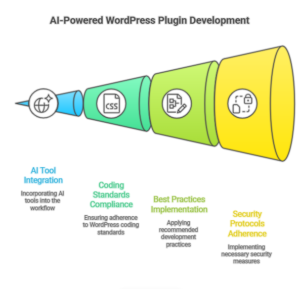
Building WordPress plugins can be a daunting task for many developers, especially when it comes to ensuring they meet WordPress coding standards, best practices, and security protocols. However, with the power of Artificial Intelligence (AI), the process can be streamlined, efficient, and even automated. In this guide, we’ll show you how you can leverage AI tools to create a production-ready WordPress plugin, following the official WordPress coding standards.
Why Use AI in Plugin Development?
AI technologies, such as natural language processing and code generation tools, can help developers at every stage of plugin development. From generating boilerplate code to detecting errors and optimizing performance, AI is transforming how developers approach WordPress plugin creation.
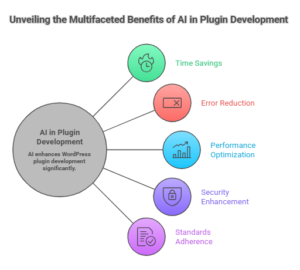
By utilizing AI, developers can save time, reduce human error, and ensure that their plugins are optimized for performance and security. Plus, it can help developers adhere to WordPress’s strict coding standards, ensuring smooth integration and fewer bugs.
Step-by-Step Guide to Building Your WordPress Plugin with AI
1. Define Your Plugin Idea
Before diving into the technical aspects, it’s essential to define what your plugin will do. The idea behind your plugin will guide its structure, features, and functionality. AI can assist in brainstorming ideas, researching plugin functionality, or providing examples of popular plugins with similar features.
-
Example Plugin Idea:
“A custom post type plugin for displaying portfolios with unique layouts.”
2. AI-Powered Code Generation for Your Plugin
Once you have the plugin idea, AI tools like GPT-4 can help generate the initial boilerplate code for your plugin. This includes the plugin’s main file, including the plugin header, activation, and deactivation hooks.
Here’s your prompt for AI assistance:
You are an expert WordPress plugin developer.

Create a production-ready WordPress plugin according to official WordPress coding standards and best practices.

Plugin Overview:
Plugin Name: [ENTER PLUGIN NAME]
Description: [YOUR IDEA HERE]
Version: 1.0.0
Author: [YOUR NAME]

Requirements:
1. Architecture:
- Use OOP (Object-Oriented Programming)
- Use proper namespace
- Modular file structure
- No procedural spaghetti code
- Separate logic for Admin and Public areas

2. File Structure:
- Main plugin file
- /includes
- /admin
- /public
- /assets/css
- /assets/js
- uninstall.php (if needed)

3. WordPress Standards:
- Follow WordPress Coding Standards
- Use proper hooks (actions & filters)
- Use prefix for functions, classes, and options
- Prevent direct file access
- Use nonces for form security
- Sanitize all inputs
- Escape all outputs
- Translation ready (Text Domain included)
- Compatible with WordPress 6.x+

4. Admin Features:
- Create admin menu or settings page (if required)
- Use WordPress native UI styling
- Proper capability checks (manage_options etc.)
- Use Settings API where appropriate

5. Database:
- Use WordPress Options API or Post Meta if possible
- Create custom table only if absolutely necessary
- Proper activation & deactivation hooks
- Cleanup on uninstall (if needed)

6. Performance:
- Enqueue scripts and styles properly
- Load assets only where needed
- Avoid unnecessary database queries
- Use AJAX securely if required

7. Security:
- Validate, sanitize, and escape everything
- Use wp_verify_nonce()
- Use current_user_can()
- Prevent SQL injection
- Follow WordPress security best practices

8. Code Output:
- Provide complete working code
- Clearly separate files
- Add comments explaining important parts
- Ready to zip and install

Now generate the full plugin code based on the above requirements.
AI can generate the main plugin file structure, admin logic, public-facing features, and even enqueue scripts/styles. You can customize it as needed.
3. Follow WordPress Coding Standards
AI can assist in ensuring your code follows WordPress best practices and coding standards. For example, AI can automatically check your plugin for proper hooks, file structure, and security measures.
4. Admin Features & Settings Page
If your plugin requires an admin panel or settings page, AI can generate the necessary code for you. It can also include capability checks to ensure that only authorized users can modify the settings, using WordPress’s native UI styling and Settings API.
5. Database & Custom Tables
For plugins that require storing data, AI can help design your database structure. It can suggest whether to use WordPress Options API or Post Meta, and if necessary, help create custom tables for your plugin.
6. Testing, Debugging, and Optimization
AI tools can assist in debugging and optimizing your plugin. It can identify performance bottlenecks, unnecessary database queries, or security vulnerabilities such as SQL injection risks. Additionally, it can help ensure that your plugin is fully compatible with the latest version of WordPress.
7. Security Best Practices
Security is a top priority when developing WordPress plugins. AI can automatically implement best practices, such as:
-
Validating and sanitizing user inputs
-
Preventing direct file access
-
Using nonces for form security
-
Escaping all outputs
8. Final Code & Documentation
AI tools can generate documentation for your plugin, explaining the functionality, usage, and code structure. This is crucial for future updates and for other developers who might use or modify your plugin.
Conclusion:
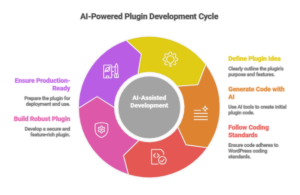
Creating a WordPress plugin has never been easier, thanks to the assistance of AI. By following the WordPress coding standards and leveraging AI tools, you can build a robust, secure, and feature-rich plugin in less time. Whether you are an experienced developer or a beginner, AI can speed up the development process and ensure your plugin is production-ready.
Start using AI to create your own WordPress plugins today, and unlock a whole new level of development efficiency and quality.